How to Find Secret 🕵Sections of Websites 📃 you May not Know About https:...


In this video I'm going to show you how you can use one of our free tools to find secret sections of websites you may have never known existed.

We recently just today is a matter-of-fact post that a video because we updated the features of a tool we have at https://www.scrapersnbots.com/webtools/get-all-links-from-webpage.php that allows you to grab the all of the links on any web page on the internet.

Well when kind of playing around with the tool I happen to put in the URL to eBay in and when I did that I was looking through the links and I noticed there's a section in there called DEALS that I never knew existed and I looked at some of them and they were good deals.

Some of these were really good deals like this Dyson vacuum cleaner. I use this tool here https://www.scrapersnbots.com/webtools/get-all-links-from-webpage.php to filter out just the deals part so I put the word deal in there which narrowed the number of links grabbed down quite a bit and then I thought to myself "well what if I just look through or grab all the links from the DEALS page?".

So I did that and then I filtered out anything that didn't have the word deal in it and it showed a pretty huge list of things related to deals on eBay and I thought to myself "this is something that you can use on pretty much any website in the world to find sections of that website you never knew existed"!.

#deals #websitedeals #viewhidden #hiddenwebsite #viewhiddenwebsite #viewhiddenwebpage

🧾 Grab ALL URLs 🔗 from a Web Page Online Tool


00:01 In this video I'm going to be showing you about an extremely useful tool that we had that we've updated which allows you to scrape all the links off of any webpage at https://www.scrapersnbots.com/webtools/get-all-links-from-webpage.php. 00:11 This is the tool here and there's various instructions at the top. In the green text box you enter a URL that you want to get all the links from and click the button Get All Links from Web Page button and it grabs all the links for you from that web page. The web address you want to scrape all the links from doesn't not have to be a main website URL it could be a subdirectory of a site. 00:34 You can filter which URLs are showing in the output text box like let's say for example you only want the links that are internal links of the website, you don't want links that lead outside the the main URL of the web page you just grabbed all the links from. In the orange text box enter the text that MUST be in each of the urls and press the Only Show URLs Containing button. To re-display all the links that were just grabbed and remove the filter, just click the Show ALL URL's button. 01:14 You have the option of converting all the URL's you grabbed from the web page into actual HTML links. Click this button with the text Convert URL's to HTML Links and all those URLs are converted into HTML code that become clickable links. You have the option of making the HTML code so that all the links open in a new window by checking the checkbox with the text Configure HTML code so links open in new window. Click the button with the text Convert URL's to HTML Links again. 01:38 You can out put all the links you extracted from the web page into spin syntax format by checking the checkbox with the text Output in Spin Syntax Format and once again click the button that reads Convert URL's to HTML Links.

Easy YouTube 📺 Tags Extension Bookmarklet App - Paste Dozens of YouTube ...


Text Transcript of Video Showing 🎬 Video Instructions About Easy YouTube.com Tags Bookmarklet App

00:01 In this video I'm going to show you the Easy YouTube Tagger bookmarklet - how to install it and how to use it.

00:09 The purpose of the Easy YouTube Tagger bookmarklet is that it makes it easier to assign tags to your YouTube video when you upload a video to YouTube. One sort of annoying feature of a YouTube video upload process is when you go to add tags to your video, you can't just paste a bunch of tags into the tags text box.

00:32 If you try taking a line by line list of keyword phrases or tags and pasting them into the tag section, you think intuitively, YouTube would know to separate them as separate tags but it doesn't, it just clumps them all together as one tag. The Easy YouTube Tagger bookmarklet allows you to take a list of tags and much more quickly paste your tags into the tag section of YouTube.

01:01 To install the Easy YouTube Tagger bookmarklet you scroll down this page a little bit. You're going to see the bookmarklet link right here where it says How to Install the Easy YouTube Tagger Bookmarklet. Look for the text that reads This is the Easy YouTube Tagger Bookmarklet. Left mouse down on the link. Drag and drop the link up to your bookmark bar and release the left mouse button.

01:24 The way you use the Easy YouTube Tagger bookmarklet is you simply go to the place on YouTube upload page where you want to put in tags for the video. Click on the Easy YouTube Tagger bookmarklet. You will see a little pop-up box giving you instructions but using the Easy YouTube Tagger bookmarklet is simple enough. In the aqua colored text box paste your line by line list of keyword phrases. Double click your mouse on the YouTube tags text box section and your entire line by line list of tags will automatically get pasted into the tag section, comma separated.

02:16 If you already have some tags in your YouTube tags text box, the Easy YouTube Tagger bookmarklet will not remove or alter these tags at all.

🧾 How You Can Get Best YouTube Video 📺 Tags on Every YouTube.com Video

🧾 How You Can Get Best YouTube Video 📺 Tags on Every YouTube.com Video


This page is going to show you several different ways you can view the tags or keywords for any video on YouTube.com.


  1. Go to the web page on YouTube that has the video you want the tags for. 

  2. Right click anywhere on the web page and make sure your mouse is not above the video or any image.

  3. Right-click with the mouse and a context menu appears.

  4. You're going to see a menu item view page source. Click that. 

  5. The source code probably looks like Gobbledygook to you but don't be concerned by that.Press CTRL + F on the keyboard. 

  6. In all web browsers this is going to bring up the search utility that is built into a web browser. 

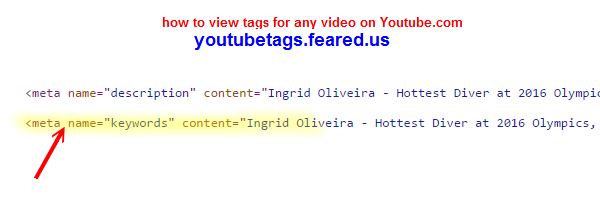
  7. Type in the word keyword it will be the first one that pops up here it is right here meta name=keywords

  8. The first one that pops up, here it is right, here meta name=keywords and then you see contents= and what's between these double quotes - those are the video tags the uploader entered when they uploaded the video to YouTube.com. 


The second method to view tags for any YouTube video is 


  1. Go to the web page that has the free YouTube tags extractor tool  https://nbots.me/wt25. 

  2. To use this tool, put in the full url or web address of the YouTube video you want to extract the tags for. 

  3. Press the View & Extract YouTube Tags button and in a matter of seconds all the tags for that YouTube video appear.

- Methods To Download ⏬ Video 📼 Directly from YouTube 📺 without Installing Software Internet Explorer Browser 2021 | Scrapers〘N〙Bots Blog

- Methods To Download ⏬ Video 📼 Directly from YouTube 📺 without Installing Software Internet Explorer Browser 2021 | Scrapers〘N〙Bots Blog

Methods To Download ⏬ Video 📼 Directly from YouTube 📺 without Installing Software Internet Explorer Browser - Text Instructions


Here are step by step text and image instructions on how to download any video from YouTube.com (or almost any other website with video)

[1] Go to the page that has the video you want to download directly without software.

[2] Press to begin the playing of the video. If there are any advertisements that play first you must first bypass them so the actual video you wish to download has begun playing and continues playing during this download process. This ensures that the video is in memory.

[3] Press F12 on your keyboard. This will bring up the developer tools panel.

[4] Click on the tab with the text Emulation.

[5] Click the dropdown box for Browser Profile and select Windows Phone (apparently, Microsoft has not heard of Iphone yet. If the Internet Explorer web browser was a kid going to school, it would definitely be riding the short bus).

[6] Go to https://www.scrapersnbots.com/blog/youtube/download-video-from-youtube-without-installing-software-internet-explorer.php to read all the instructions which include images and step by step video

Make Website Faster using Google Page Speed Insights Tool

Make Website Faster with Google Page Speed Insights


Make Website Faster with Google Page Speed Insights - TABLE OF CONTENTS

When you visit the web page on Make Website Faster with Google Page Speed Insights you will find full information along with video and images on the follow topics related to Make Website Faster with Google Page Speed Insights

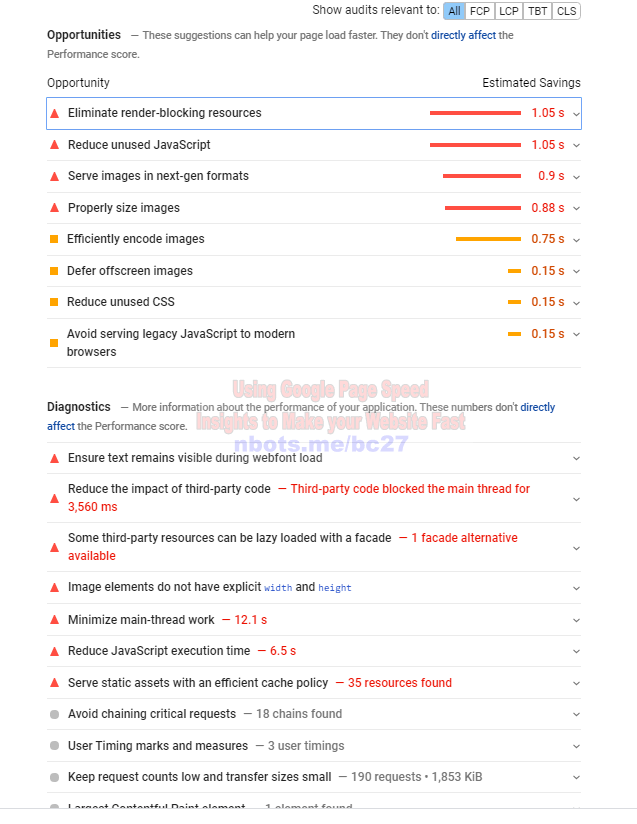
Since for most websites and blogs, Google is going to be the provider of 80% or more of your natural traffic, then the ultimate tool to use to make your website ideal, in terms of page speed, and web page customer satisfaction is the Google tool Google Page Speed Insights.

To use the Google Page Speed Insights tool to make your web pages faster and better: ... read all of Make Website Faster with Google Page Speed Insights at: https://www.scrapersnbots.com/blog/content/make-website-faster-with-google-page-speed-insights.php

Google Page Speed Insights Suggestions For Speeding Up Web Page
Image of Increase Speed Of Website Google Page Speed Insights Suggestions For Speeding Up Web Page.
Google Page Speed Insights Suggestions For Speeding Up Web Page

====================================================================
== Resources Related to Make Website Faster with Google Page Speed Insights ==
====================================================================

===========================================================
======= Follow https://www.scrapersnbots.com ==============
===========================================================

Watch Videos on YouTube.com Related to Make Website Faster with Google Page Speed Insights

Use Cloudflare to Enhance the Performance ⏳ of your Website


In this video I'm going to show you how you can increase the speed of your website by using Cloudflare and many other benefits of cloudflare which has a 100% free plan as well. 

https://www.scrapersnbots.com/blog/content/how-to-dramatically-increase-the-speed-of-your-website-use-cloudflare.php


The web page that accompanies this video can be found on the screen right now which tells you all about Cloudflare and how to use it for the numerous benefits including your web site speed.


Cloudflare is essentially an alternate DNS server which is basically the phone book for the internet when a person types in your website address into their web browser a DNS server take that web address which is letters www.google.com or yahoo.com or whatever it is and turns it into numbers because that's how the internet works and communicates with each other.


Computers communicate with each other via a numeral system called IP addresses so a DNS server takes that web address that your website visitors enter into the web browser to try to get to your website and turn that into the IP address so then the website content can be displayed in your visitors web browser. 


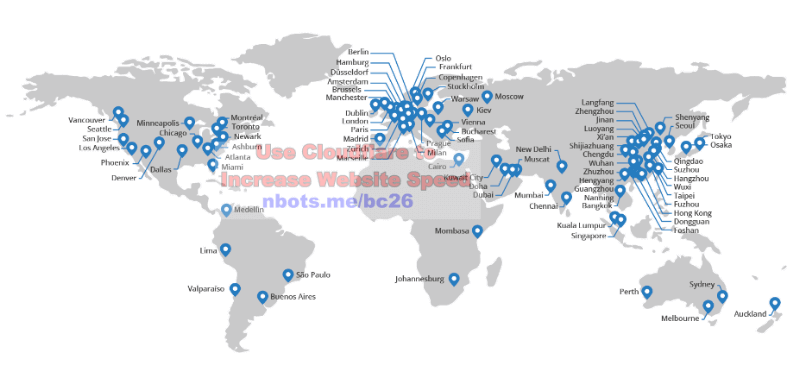
Cloudflare has many different technologies which helps speed up your website and the way it basically does that is Cloudflare has hundreds of different servers all across the world and the DNS server that is closest to your website visitors geographical location is the Cloudflare server that serves up the web pages to your website visitor.


That's one way that your website is displayed and it's usable faster using Cloudflare another way is Cloudflare caches most of your website static content on your website that doesn’t change much, for example on this web page this video is not likely to change much ever and the images are not likely to change.


The Cloudflare server stores them at its web server so the second time your website visitor or third time or any subsequent time after the first time the visitor comes to visit your website Cloudflare serves up a cached version of the images and the other static content which makes the webpage show faster as well.


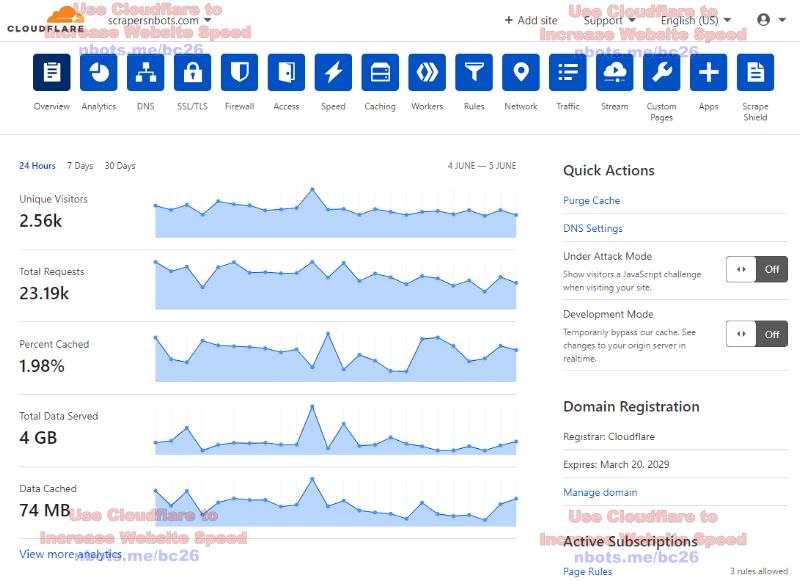
This is the Cloudflare member area right here. Cloudflare also has a lot of other benefits including analytics. The website analytics that Cloudflare provides are pretty basic unless you have a paid upgraded account. 


Cloudflare has different types of SSL encryption that you can enforce on your website and that's another benefit of Cloudflare is if you don't already have a secure website meaning, a website with the web address of https vs. http, you can get a security certificate 100% free through Cloudflare.


Cloudflare has a built-in firewall and there are other things to increase the speed of your website. See how it shows here that the content on our website, Scrapers〘N〙Bots, displays in just 1 second. 


That's quite fast but there are other factors that are involved here regarding page speed, it's not as if you have a slow website and you sign up with Cloudflare all the sudden you're going to be doing the quarter mile in 5 seconds it's not like that.


There are other factors involved when it comes to making your website as fast as possible. Come to this page at https://www.scrapersnbots.com/blog/content/how-to-dramatically-increase-the-speed-of-your-website-use-cloudflare.php ...


Scrape Thousands of Long Tail Keywords 7 or More Words in Length, Zero Competition

 scrapersnbots.com website logo. 227 Darling st., Torrington CT., 06790   (860) 407-2687‬   Better Business Bureau

Scrape Thousands of Long Tail Keywords 7 or More Words in Length, Zero Competition

Simply Enter a Root/Starting Keyword Phrase, Make a Couple of Simple Selections, Sit Back as you Watch the Software Fills Up with 0 Competition, Google Auto-Complete, Long Tail Keyword Phrases

Arrow pointing to software download button.
 
 
only $17
Google AutoComplete Keyword Scraper software is compatible with Windows 10, 8.1, 8, 7, XP Pro + Home

The Easiest, Fastest Way to Scrape Thousands of Extremely Long Tail Keyword Phrases that Will Bring Website Traffic to YOUR Website

Finding out the words and phrases people are typing into Google is the lifeblood of any online business, but what about ...

... Getting Long Tail Keyword Phrases (6, 7, 8 words long or more) Nobody Else Has or Even Knows About?!

Google Auto Complete Keyword Scraper has a special algorithm that causes Google to reveal ...

  1. Keyword phrases that nobody else has.
  2. Keyword phrases that are EXTREMELY Long Tail (6, 7, 8 words long and even longer).

What is Google Auto Complete and Why is it Important for Getting Awesome Keywords?

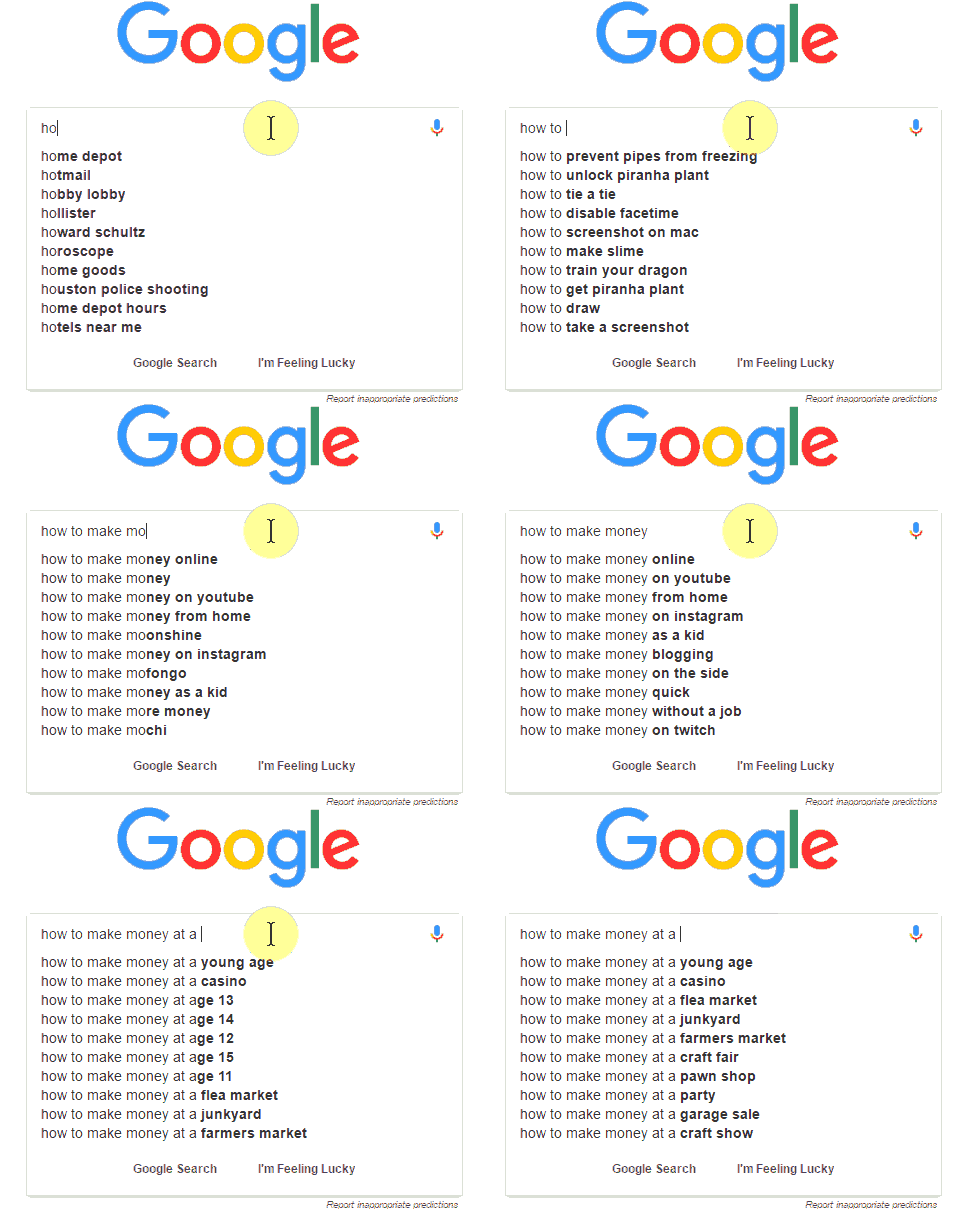
Navigate your web browser to the Google search engine and begin typing in any words into the search box. As you type...

  • Do you notice the dropdown box showing as many as 10 keyword suggestions?
  • As you keep typing, adding/removing/changing letters/words, notice how these keyword phrases in the dropdown change?
  • Do you have any idea WHY Google is showing all these keyword phrases to you?

Animation Showing Google Auto Suggest Dropping Down Keyword Suggestions as you Type.

Google is Showing you Exactly What Other People, in the Past, Have Typed into Google that is Closely Related to What YOU Have Typed!

Read that statement again. Read it one more time. Google is SHOWING YOU what other people have typed in Google. This means if you create content around any of these keyword phrases there WILL BE an audience for those keyword phrases!

List of Google Auto Complete Keyword Phrases Scraped on Fast Mode [A - Z]

In a hurry to get a bunch of long tail keywords, fast? Then simply set the software to scrape insert the letters of the alphabet A - Z between each word of the keyword phrase.

For the Fastest Scraping, Select Scrape BETWEEN each word of the keyword phrase and insert A - Z to Invoke the AutoComplete Dropdown for Scraping.

Using this setting, with a starting/root keyword phrase of long tail keyword, Google Auto Complete Keyword Scraper scraped 198 keywords in just 90 seconds.

List of Google Auto Complete Keyword Phrases Scraped on Deep Mode [Aa - Zz]

Want to get the deepest, most untapped, 0 competition keyword phrases?

To scrape the largest list of the longest tail keyword phrases that no one else knows about, that have no competition, select the A - Z, Aa - Zz, 0 - 9 options.

Using these settings, with a starting/root keyword phrase of long tail keyword, Google Auto Complete Keyword Scraper scraped 429 keywordsin about 20 minutes.


Quickly Filter the List of Auto Complete Scraped Keywords to Keep Only the Keyword Phrase Gems

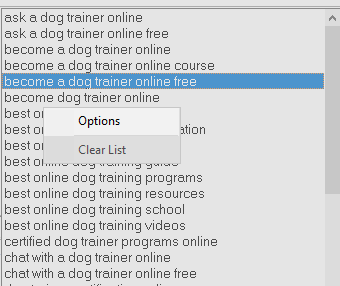
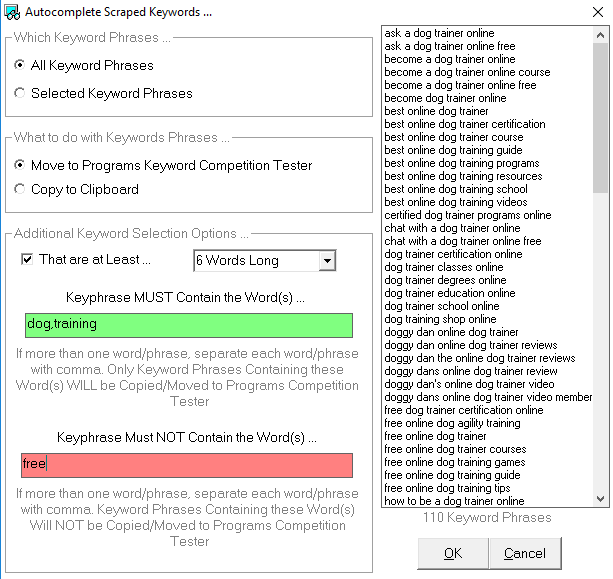
After Google Auto Complete Keyword Scraper software finishes, right click the list of keyword phrases it has scraped and select the menu item options. This displays a dialog box that allows you to quickly only keep the exact keywords you want.

Right click keywords list options menu item.

Keyword filtering options include:

  • Only keep keyword phrases that are at least...
    • 5 words long or more.
    • 6 words long or more.
    • 7 words long or more.
  • Only keep the keyword phrase that contains any specific word or set of words you specify.
  • Only keep the keyword phrase that DON'T contain any specific word or set of words you specify.

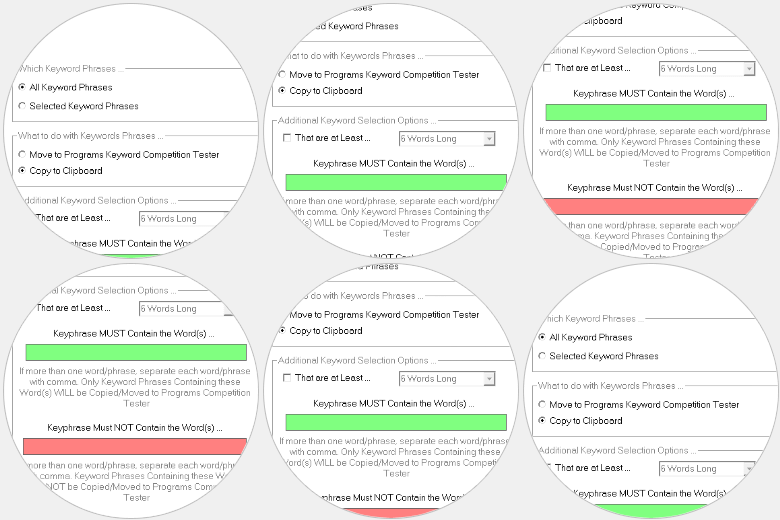
Options dialog box allows you to filter keyword phrases so you only keep keywords that are at least X number of words long and/or DO or DO NOT contain specific words in them.

Google Auto Complete Keyword Scraper Features

Image of Auto Suggest Scraping Options to Fine Tune What is Scraped from Google Auto Suggest.

Control What's Scraped & How

You Have Fine Tuned Control Over What Gets Scraped From The Google Auto Suggest And How It's Scraped.

 
Image of Google Auto Suggest Keyword Scraper Keyword Filtering Options.

Advanced Keywords Filtering

Advanced Filtering Options That Let You Remove/Keep Keyword Phrases Based Upon How Long Tail They Are As Well As Word Filtering - Only Save Keywords That DO Or DO NOT Contain Specific Words.

 
Image of Options Menu that Lets you Select Google Country for Keyword Scraping.

Select Google Scraping Country

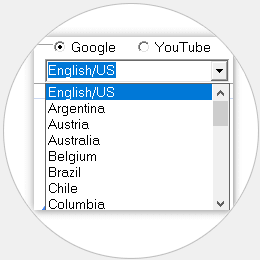
Select Your Desired Google Country For Auto Complete Keyword Scraping.

 
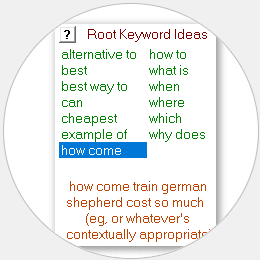
Image of Built in Google Related Keywords Provides Ideas for Other Root Keyword Phrases.

Related Keywords Ideas

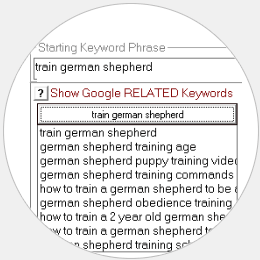
Built In Google Related Keywords Modules Gives You Ideas For Additional Root Keyword Phrases To Help You Build The Hugest List Of Long Tail Keywords.

 
Image of Built in Preposition Modifyers to Stimulate your Imagination for Even More Root Keyword Ideas to Build and Expand you List of Scraped Keywords into the Thousands.

Keyword Modifyer Module

Built In Prepositions/Word Modifyers Like How ToWhereBestCheapest To Stimulate Imagination For More Root Keywords To Expand Your Keywords Lists Into The 1,000'S.

 
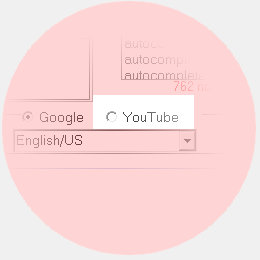
Image of YouTube Auto Complete Keyword Scraper Included as Bonus Software with Google Auto Complete Keyword Scraper.

FREE YouTube Scraper

YouTube.Com Auto Complete Keyword Scraper Included, 100% Free With Google Auto Complete Keyword Scraper, As Bonus Software..

Table of Contents

A Long Tail Keyword is Valuable Because it is

  • More Specific: When someone types a long tail keyword phrase/search into Google, it means that person has a more specific idea in mind, in terms or what they are looking for. When it comes to online sales, this means the persons is likely much more ready to make a purchase. This is just one of the advantages of long tail keywords. If someone types into Google 'running shoes(a short tail keyword) it indicates they have a general idea of what they are looking for. But if someone types into Google 'how much do Mens Nike React Element 55 running shoes cost?(a long tail keyword) it shows they know EXACTLY what they are looking for so the purchase of that product is likely much more imminent. If you are an affiliate or internet marketer that lists those running shoes on your blog or website, you are much more likely to make a commission from a sale.
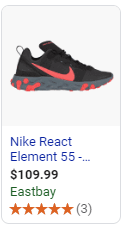
  • Going to Cause More Specific Ads to be Displayed on your Website or Blog: If you display ads on your blog or website that earn you commissions, if someone persons a much more specific and long tail keyword, it is going to cause much more specific ads to be displayed on your blog or website. Example of an ad for specific product generated by long tail keyword phrase search.Going with our previous long tail keyword search example of 'how much do Mens Nike React Element 55 running shoes cost?', imagine if someone clicks a search listing for that keyword phrase and lands on your web page. Now imagine if there is a display ad on your site for Mens Nike React Element 55 running shoes with a picture of those shoes with the ad showing them on sale for $20 off. It is MUCH more likely they are going to click on that ad and you will make a commission that way.
How Many Words in a Long Tail Keyword?

Generally speaking, a keyword phrase that is 5 words long or longer is considered a long tail keyword. To a certain extent, what is considered long tail is niche dependant. In other words, a niche that has low competition overall, a 4 word keyword phrase could be long tail as the term long tail is as much about low competition as it is about how many words contained in the keyword phrase.

As far as online marketing is concerned, the more words in the keyword phrase the better because it means less competition and more specific intent on the part of the person doing the Google search. Some internet marketers are concerned that a keyword phrase with too many words in it isn't going to get enough searches to be worth creating content around. While it may seem more appealing to go after that 3 word keyword phrase that gets 50,000 searches a month, the competition agains all the other websites is going to be fierce. A better bet is to go after the keyword phrases that have 6, 7 even 8 words in them. While these really long tail keywords may only get 50 or 100 searches a month, The content you create around these long tails is much more likely to show up on the first page of Google with little to no competition.

How to Find Long Tail Keywords with Low SEO Difficulty

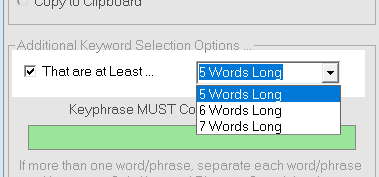
After you have used Google AutoComplete Keyword Scraper to find a high VOLUME of keywords, you then want to right click the list of scraped keywords and click the options menu item. This will open a dialog box/window that allows remove unwanted keyword phrases quickly. In the section with the header text Additional Keyword Selection Options ... check the checkbox with the text That are at Least .... Checking this checkbox will enable a combo dropdown box with three options:

  • 5 Words Long.
  • 6 Words Long.
  • 7 Words Long.

Remove any keyword phrases that are not at least 5 words long or longer.

Select any one of the three. This will cause the program to remove any keyword phrases it has scraped that are not at least 5 words long or longer. This simple act alone will leave you with keyword phrases that have a lower SEO difficulty because they will be long tail keyword phrases.

The next step is to move all of these remaining long tail keywords to the programs Long Tail Keyword Competition Tester module. This part of the software program performs an allintitle:allinurl:, and allintext: specialized Google search which will reveal which of the keyword phrases have a very low number of web pages that are optimized for each of the keyword phrases. After this part of the software completes, keep all of the long tail keyword phrases that get an overall SEO difficulty score of either A or B. Now you will be left with a list of keyword phrases that are all at least 5 words long and have very few web pages optimized for each of the keywords phrases. Creating content around these keyword phrases and ranking well with them should be very easy and you should have little to no SEO difficulty for these keyword phrases.

How to Use Long Tail Keywords in Content

When creating content, be it a blog post or web page or even YouTube video, don't make the mistake of trying to rank for more than one keyword phrase at a time. Pick ONE keyword phrase and make the content of the entire page tightly and narrowly focused around the ONE keyword phrase. Here is where and how to put the long tail keyword phrases in your content:

  1. Once in the page title. If you are using Wordpress, this means putting the keyword phrase in the textbox that reads Enter Title Here. This will automatically cause that keyword phrase to also be placed in ...
  2. The url/web address of the web page.
  3. The tag of the web page. Make this the only tag for the page. Remember, you want that web page to be TIGHTLY focused around that ONE keyword phrase.
  4. Once in the first paragragh and once in the last paragraph of the web page/blog post.

Forget keyword stuffing. If you pick the right keyword phrases, which you have already done in the previous steps, keyword stuffing is not only not necessary but can actually hurt your pages SEO rankings.

Why are Long-Tail Keyword Terms so Important to SEO

The term SEO, which stands for Search Engine Optimization is the answer to that question. Think about it. What is search engine optimization? Search engine optimization means optimizing your web pages and website for the search engines. You can optimize a web page for a short tail keyword phrase just as easily as a long tail keyword phrase...

  1. Put the keyword phrase in the page title.
  2. Put the keyword phrase in the url of the web page.
  3. Put the keyword phrase in one or two of the page header tages (h1, h2, h3).

The DIFFERENCE though is the amount of competition. There are going to be hundreds of thousands of web pages that are SEO optimized for a keyword term like 'german shepherd'. That means Google, and other search engines, have to decide between your web page and thousands of others. Might as well play the lottery. But how about the long-tail keyword phrase 'train german shepherd puppy to jump through a hoop'? Chances are there are going to be very few web pages out there optimized for that exact keyword phrase. That makes the search engines decision to put YOUR web page on the first page of search results a lot easier and a lot more likely.

Google Autocomplete Settings

As far as the Google Auto Complete Keyword Scraper Google autocomplete longtail keyword tool is concerned, possible settings that affect how this Google autocomplete longtail keyword tool scrapes keywords ...

If you're Looking to Scrape Some Keywords Quickly ...

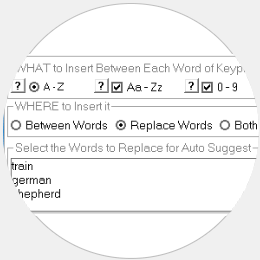
In the What to Insert Between Each Word of Keyphrase section:

  1. Select A - Z.
  2. Make sure the other two options, Az - Zz and 0 - 9 are UNCHECKED.

In the Where to Insert it section:
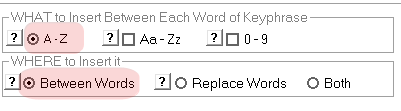
  • Select Between Words.

For the Fastest Google AutoComplete Scraping Settings, Select Scrape BETWEEN each word of the keyword phrase and insert A - Z to Invoke the AutoComplete Dropdown for Scraping.

If you're Looking to Auto Complete Scrape the Largest List of Long Tail Keywords, many Untapped, Unused Keyword Phrases ...

As far as the Google Auto Complete Keyword Scraper Google autocomplete longtail keyword tool is concerned, while this process is going to take a lot longer for the software to complete, IT IS WORTH THE WAIT!

In the What to Insert Between Each Word of Keyphrase section:

  1. Select A - Z.
  2. Check Aa - Zz.
  3. Check 0 - 9.

In the Where to Insert it section:
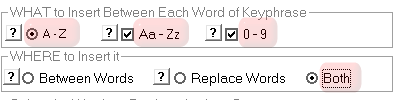
  • Select Both.

To scrape the largest list of the longest tail keyword phrases that no one else knows about, that have no competition, select the A - Z, Aa - Zz, 0 - 9 options.

COMMENTS & QUESTIONS on GOOGLE AUTO COMPLETE KEYWORD SCRAPER SOFTWARE

Feel free to submit your comment below. Anything that does not contribute and is just spam will automatically be deleted. Questions marked by * are required. Comments are checked by a human to make sure they are not spam/automated and are on topic and related to 〘Google Auto Complete Keyword Scraper〙Auto Complete Scrape Lots of Key Phrases no one Else is Using, 6, 7, 8 Words Long, Zero Competing Webpages .
Turk
Hi, I found you today and I had a couple of questions. I see that you have 'Google Auto Complete Scraper', and 'Infinity Google Keywords.' Could you go explain the differences and why I would need/want both?
You do not need both programs. Infinity Google Keywords software scrapes from the google related keywords while auto complete scraper scrapers from the auto complete. The Google AutoComplete Scraper has been updated and advanced significantly from the sales page and now includes the Long Tail Keyword Competition Checker as well.
Turk
Ever hear of something called 'Keyword XP Pro?' I tried this tool out for a while (when it worked - didn't work all the time) but the 'support' they have says Google changed something in AdWords, and now it won't be up and running for some time.
Google Auto Complete Scraper has nothing to do with backend api dependencies like Google Adwords. Google Auto Complete Scraper literally scrapes from the front end of Google by input keyboard press events. You can see a video at https://www.youtube.com/watch?v=M0mUGJtT7uQ
Turk
Keyword XP Pro also chooses buyer keywords, (as in things that were being searched for right now - today,) but had the added benefit of showing trends and the months that the words were popular, ect. An excellent feature. KWXP seemed awesome, but I don't think it will be revived. Ever hear of KWXP? If so, does this seems like something SNB would create/re-create? Just curious. (Good videos on the products by the way.) Thanks for your help!
The included Long Tail Scraper software also includes a link to Google Trends page for each keyword. We are pretty confident you are going to love our software and there is not way you can't love the price! Thanks for your great questions Turk. Helps keep us aware of what is important to customers.