🧾 How You Can Get Best YouTube Video 📺 Tags on Every YouTube.com Video
This page is going to show you several different ways you can view the tags or keywords for any video on YouTube.com.
Go to the web page on YouTube that has the video you want the tags for.
Right click anywhere on the web page and make sure your mouse is not above the video or any image.
Right-click with the mouse and a context menu appears.
You're going to see a menu item view page source. Click that.
The source code probably looks like Gobbledygook to you but don't be concerned by that.Press CTRL + F on the keyboard.
In all web browsers this is going to bring up the search utility that is built into a web browser.
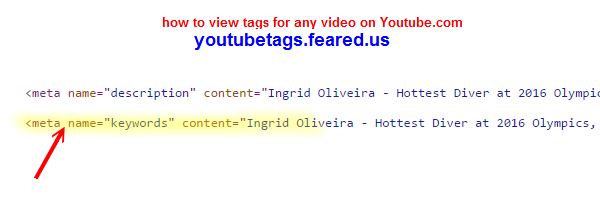
Type in the word keyword it will be the first one that pops up here it is right here meta name=keywords.
The first one that pops up, here it is right, here meta name=keywords and then you see contents= and what's between these double quotes - those are the video tags the uploader entered when they uploaded the video to YouTube.com.
The second method to view tags for any YouTube video is
Go to the web page that has the free YouTube tags extractor tool https://nbots.me/wt25.
To use this tool, put in the full url or web address of the YouTube video you want to extract the tags for.
Press the View & Extract YouTube Tags button and in a matter of seconds all the tags for that YouTube video appear.