ALISSA LONGO, $250,000 Bond Alissa Longo wanted by the police for outstanding warrants with bond $250,000

WANTED BY THE POLICE
ALISSA LONGO, $250,000 Bond

Alissa Longo wanted by the police for outstanding warrants with bond $250,000.

DESCRIPTION

ALIASES: Alissa Longo, Alissa Lynn Longo, Allie, Allie-Cat
DATE OF BIRTH: Sep. 17, 1985PLACE OF BIRTH: Waterbury Conn.
HAIR: BrownEYES: Brown
HEIGHT:WEIGHT: 130 lbs.
SEX: FemaleRACE: White/Caucasian
NATIONALITY: ItalianLANGUAGES: English
UNIQUE CHARACTERISTICS: Alissa Longo has a unique, raspy voice.

REMARKS

Alissa Longo is a repeat offender in the criminal justice system. Because of this, Alissa Longo's bond is $250,000 and is expected to be raised upon capture. Because of Alissa Longo's repeat offender status, Alissa is facing a lengthy prison sentence which may make her desperate and dangerous. Alissa Longo is aware of current warrants for her arrest and is actively fleeing the law. If you know where Alissa Longo is located or resides, contact the Waterbury Connecticut police immediately at 203-574-6911.

CAUTION

Do not provide Alissa Longo with any assistance in the form of either money food shelter or otherwise. If you help Alissa Longo, you are guilty of the offense any offense of aiding and abetting you will be arrested! If you see Alissa long ago or know Alissa Longos whereabouts, call the Waterbury Connecticut police immediately at 203-574-6911.

PDF Version of Alissa Longo Wanted by Law

How to View Hidden Content on IMGUR 🕵

How to View Hidden Content on IMGUR 🕵


https://nbots.me/bg15
OR
https://www.scrapersnbots.com/blog/general/how-to-view-hidden-content-on-imgur.php

This Video Covers The Following Topics Regarding Revealing Hidden Content On Imgur.com

*** How to View Hidden Content on Imgur ***
*** View Hidden Content on Imgur Javascript Bookmarklet ***
*** How to View All NSFW Stuff on Imgur ***
*** How to View Mature Hidden Content on Imgur.com***


Image of How To View Hidden Content Imgur Website After Hidden Content Revealed.


#hiddencontentimgur #imgur #imgurhiddencontent #imgurnsfw #imgurmaturecontent
======================================================
======= Follow https://www.scrapersnbots.com =========
======================================================

Video URL: https://youtu.be/qSCDfv1J3v0
Facebook: https://www.facebook.com/scrapersnbots
Twitter: https://twitter.com/scrapersnbots
Linkdin: https://linkedin.com/in/scrapersnbots
YouTube: https://www.youtube.com/c/ScrapersNbots

How to See 👁 Hidden Content on Facebook com

How to See 👁 Hidden Content on Facebook com


https://nbots.me/bf7
OR
https://www.scrapersnbots.com/blog/facebook/how-to-see-hidden-content-on-facebook.php

𝕊𝕖𝕖 ℍ𝕚𝕕𝕕𝕖𝕟 ℂ𝕠𝕟𝕥𝕖𝕟𝕥 𝕠𝕟 𝔽𝕒𝕔𝕖𝕓𝕠𝕠𝕜 𝔹𝕠𝕠𝕜𝕞𝕒𝕣𝕜𝕝𝕖𝕥 𝔻𝕠𝕨𝕟𝕝𝕠𝕒𝕕

Here is the download link for the bookmarklet to view hidden Facebook content: https://nbots.me/bco10

Because this bookmarklet is Javascript code it can be dragged and dropped to the bookmarks bar of almost any web browser, including Firefox, Chrome and Internet Explorer and can be used on almost any platform including mobile devices because they support Javascript.

Once you have installed this bookmarklet to your web browser bookmarks bar, once you are on your desired Facebook page, click the bookmarklet and instantly all the css code with be stripped away, including the two previously mentioned commands that hide web page elements.

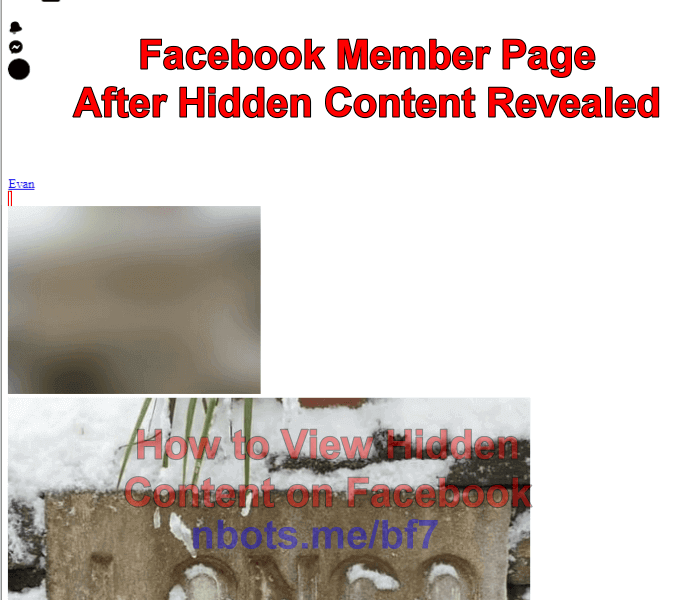
Be prepared for a shock because ALL code that formats the layout of the Facebook page is removed, not just the code that hides elements on Facebook pages. Be prepared for a completely unrecognizable Facebook page after clicking on the bookmarklet as the images below show.


Image of How To View Hidden Facebook Content Member Page After Hidden Content Revealed.


#facebookhiddencontent #viewfacebookhiddencontent #viewfacebookhidden

======================================================
=======  Follow https://www.scrapersnbots.com ========
======================================================

Video URL: https://youtu.be/K-HDkdC8x3Y
Facebook: https://www.facebook.com/scrapersnbots
Twitter: https://twitter.com/scrapersnbots
Linkdin: https://linkedin.com/in/scrapersnbots
YouTube: https://www.youtube.com/c/ScrapersNbots

How to View Hidden Content at Tumblr🕵

How to View Hidden Content at Tumblr🕵


https://nbots.me/bg14
OR
https://www.scrapersnbots.com/blog/general/how-to-view-hidden-content-on-tumblr.php

A free browser bookmarklet that reveals any hidden content on a Tumblr page or ANY web page: https://nbots.me/bco10

CSS is what gives a web page its look and layout and there are two main directives that cause content on Tumblr to be hidden, display:none; and visibility:hidden;. For example if you view the source code on any Tumblr page and do a search (CTRL + F) for either of those two items, you will be able to see what things Tumblr.com is trying to keep hidden from its visitors. This free bookmarklet can be installed quickly and easily to any web browser and a single mouse click will remove all this formatting, exposing any and all hidden content on any Tumblr page.

Image of How To View Tumblr Hidden Content Tumblr Blog After Expose Hidden Bookmarklet Clicked.
Tumblr web page after view hidden content bookmarklet is
clicked revealing all the hidden content on the Tumblr.com page.


#viewhiddencontenttumblr #hiddencontenttumblr #viewhiddentumblr

======================================================
======= Follow https://www.scrapersnbots.com =========
======================================================

Video URL: https://youtu.be/hdQxYAQskWA
Facebook: https://www.facebook.com/scrapersnbots
Twitter: https://twitter.com/scrapersnbots
Linkdin: https://linkedin.com/in/scrapersnbots
YouTube: https://www.youtube.com/c/ScrapersNbots

How to View Hidden Content on Twitter com 🐦

How to View Hidden Content on Twitter com 🐦


There are two ways or two types of hidden content on Twitter you may wish to reveal:

[1] If you are merely looking to display sensitive content that your Twitter settings won't allow, then proceed to the section below on How to Display Sensitive Content on Twitter. This will show you how to have your Twitter account automatically display potentially sensitive data without warning you first as such.

[2] The other type of hidden content you may be more interested in revealing is stuff that Twitter has hidden on their pages via code. In other words, content they are trying to hide from everyone. Believe it or not, you can reveal this type of hidden Twitter content with a simple mouse click and the use of a free web browser bookmarklet.
 

Image of View Twitter Hidden Content Check Display Media That May Contain Sensitive Data Checkbox.

#viewhiddencontenttwitter #hiddencontenttwitter #viewhiddentwitter

======================================================
======= Follow https://www.scrapersnbots.com =========
======================================================

Video URL: https://youtu.be/hdQxYAQskWA
Facebook: https://www.facebook.com/scrapersnbots
Twitter: https://twitter.com/scrapersnbots
Linkdin: https://linkedin.com/in/scrapersnbots
YouTube: https://www.youtube.com/c/ScrapersNbots

How to View 👀 Hidden Content on ANY Web Page


How to View 👀 Hidden Content on ANY Web Page

https://nbots.me/bco10 OR https://www.scrapersnbots.com/blog/code/view-hidden-content-on-any-website-bookmarklet.php

This free bookmarklet allows you to view EVERYTHING on any web page, including anything the website owner wants to keep hidden for one reason or another.

What this bookmarklet does is completely strips all css styles from the current web page you are on with a single click. It is css styling with styles such as display:none; and visibility:hidden; which keep things hidden from your view.

This bookmarklet is purposely coded so that anything that was previously hidden will be surrounded with a thin red border to give you visual feedback as to what was originally hidden from your view.

Netflix website after bookmarklet to view hidden
content is clicked and all css styling removed


#viewhiddencontent #hiddencontent #hiddenwebpage #viewhiddencontentwebpage

==================================================== ===== Follow https://www.scrapersnbots.com =========
====================================================

How to Create Bookmarklet ⭐ for Internet Explorer Web Browser IE

How to Create Bookmarklet ⭐ for Internet Explorer Web Browser IE


𝕥𝕠 ℂ𝕣𝕖𝕒𝕥𝕖 𝔹𝕠𝕠𝕜𝕞𝕒𝕣𝕜𝕝𝕖𝕥 ⭐ 𝕗𝕠𝕣 𝕀𝕟𝕥𝕖𝕣𝕟𝕖𝕥 𝔼𝕩𝕡𝕝𝕠𝕣𝕖𝕣 𝕎𝕖𝕓 𝔹𝕣𝕠𝕨𝕤𝕖𝕣 𝕀𝔼:

[1] Make sure the Favorites toolbar is visible. Right click the Internet Explorer toolbar to bring up its context menu.

[2] Favorites Bar should be checked.

[3] If the bookmarklet comes as a link you can just drag and drop that link into the Internet Explore Favorites Bar.

𝕀𝕗 𝕪𝕠𝕦 𝕟𝕖𝕖𝕕 𝕥𝕠 𝕞𝕒𝕟𝕦𝕒𝕝𝕝𝕪 𝕔𝕣𝕖𝕒𝕥𝕖 𝕥𝕙𝕖 𝕓𝕠𝕠𝕜𝕞𝕒𝕣𝕜𝕝𝕖𝕥 𝕚𝕟 𝕀𝕟𝕥𝕖𝕣𝕟𝕖𝕥 𝔼𝕩𝕡𝕝𝕠𝕣𝕖𝕣:

You first need to create a bookmarklet in Internet Explorer which you will then edit to replace the url part of the bookmarklet with the Javascript code that makes up the bookmarklet.

[1] Right click a blank part of the web page where the bookmarklet code is.

[2] From the context menu select Add to Favorites OR click the star icon ⭐ at the very left side of the Internet Explorer Favorites bar. Either of these will add the current page to your favorites in Internet Explorer.

This will add the current web page to your favorites.

You now want to edit the name of the bookmarklet and replace the url of that bookmarklet with the bookmarklet Javascript code:

[1] Right click the bookmarklet and click Properties on the context menu that appears.

[2] In the properties dialog box click on the General tab.

[3] In the text box, rename the shortcut so the name reflects what the bookmarklet will do. For example, if the bookmarklet is to enable right click on a web page, you could name the bookmarklet Enable Right Click.

[4] Then, in the properties dialog box click on the Web Document tab.

[5] In the text box for the url, replace the text that is there with the Javascript code that is the bookmarklet.

[6] Be sure to click the Apply button.


#bookmarkletinternetexplorer #bookmarkletie #iebookmarklet

======================================================
=======     Follow https://www.scrapersnbots.com     ==============
======================================================

How to Create Bookmarklet in Firefox🦊To create and use bookmarklets in t...

How to Create Bookmarklet in Firefox🦊


𝕥𝕠 ℂ𝕣𝕖𝕒𝕥𝕖 𝕒𝕟𝕕 𝕦𝕤𝕖 𝕓𝕠𝕠𝕜𝕞𝕒𝕣𝕜𝕝𝕖𝕥𝕤 𝕚𝕟 𝕥𝕙𝕖 𝕄𝕠𝕫𝕚𝕝𝕝𝕒 𝔽𝕚𝕣𝕖𝕗𝕠𝕩 𝕨𝕖𝕓 𝕓𝕣𝕠𝕨𝕤𝕖𝕣 ... To create and use bookmarklets in the Mozilla Firefox web browser, you first have to make sure that the favorites toolbar is set to be visible. This video shows you ... [1] How to create a bookmarklet in Firefox if the web page with the bookmarklet provides the bookmarklet as a link. [2] How to create a bookmarklet in Firefox if the web page with the bookmarklet provides the bookmarklet as Javascript code and you have to create the bookmarklet manually. #bookmarkletfirefox #firefoxbookmarklet #createbookmarkletfirefox ====================================================== ======= Follow https://www.scrapersnbots.com ============== ====================================================== Video URL: https://youtu.be/6JNp1yrIAns Facebook: https://www.facebook.com/scrapersnbots Twitter: https://twitter.com/scrapersnbots Linkdin: https://linkedin.com/in/scrapersnbots YouTube: https://www.youtube.com/c/ScrapersNbots

How to Create Bookmarklet in Google Chrome: ❶ to Create a Bookmarklet in...


𝕥𝕠 ℂ𝕣𝕖𝕒𝕥𝕖 𝕒 𝔹𝕠𝕠𝕜𝕞𝕒𝕣𝕜𝕝𝕖𝕥 𝕚𝕟 𝔾𝕠𝕠𝕘𝕝𝕖 ℂ𝕙𝕣𝕠𝕞𝕖:

https://www.scrapersnbots.com/blog/general/how-to-create-bookmarklet-in-chrome.php Creating a bookmarklet in Google Chrome web browser is very easy to do. The first thing you want to do is make sure that Google Chrome web browser bookmarks bar is visible. If the web page with the bookmarklet has the bookmarklet as a link you can just drag and drop the link to the Chromes bookmarks bar. #chromebookmarklet #createbookmarkletchrome ====================================================== ======= Follow https://www.scrapersnbots.com ============== ====================================================== Video URL: https://youtu.be/WF58vIlYuLk Facebook: https://www.facebook.com/scrapersnbots Twitter: https://twitter.com/scrapersnbots Linkdin: https://linkedin.com/in/scrapersnbots YouTube: https://www.youtube.com/c/ScrapersNbots

- How to Create Bookmarklet in Chrome 2021 | Scrapers〘N〙Bots Blog

- How to Create Bookmarklet in Chrome 2021 | Scrapers〘N〙Bots Blog

Creating a bookmarklet in Google Chrome web browser is very easy to do. The first thing you want to do is make sure that Google Chrome web browser bookmarks bar is visible.

  1. At the very far right of the Google Chrome toolbar are three vertical dots ⋮. This is the settings menu. Click it.
  2. When the menu appears, mouse over Bookmarks to open up a sub menu.
  3. In this sub menu click the menu item Show Bookmarks Bar if it is not already checked. If it is already checked then do not click it and proceed to the next step of creating a bookmarklet in Chrome.
How to make sure bookmarks bar is visible in Google Chrome

 Read All of How to Create, Edit and Use Bookmarks in Google Chrome Web Browser

Free Bookmarklet to Enable Right Click on Web Page

Free Bookmarklet to Enable Right Click on Web Page


Free Bookmarklet to Enable Right Click on Web Page https://nbots.me/bco9 OR https://www.scrapersnbots.com/blog/co... To easily install this bookmarklet to your web browsers bookmarks bar: [1] Mouse down the left mouse button over the above bookmarklet link and hold the left mouse button down. [2] With the left mouse button still depressed, drag the bookmarklet link to your web browsers bookmarks bar. [3] When your mouse is where you wish to place the bookmarklet, release the left mouse button. [4] Any time you come across a web page that blocks the right click context menu, click the bookmarklet, problem solved. #rightclickbookmarklet #bookmarkletenablerightclick ====================================================== ======= Follow https://www.scrapersnbots.com ============== ====================================================== Video URL: https://youtu.be/M7DsqhPyVG8 Facebook: https://www.facebook.com/scrapersnbots Twitter: https://twitter.com/scrapersnbots Linkdin: https://linkedin.com/in/scrapersnbots YouTube: https://www.youtube.com/c/ScrapersNbots

- Bookmarklet to Enable Right Click on Web Page 2021 | Scrapers〘N〙Bots Blog

- Bookmarklet to Enable Right Click on Web Page 2021 | Scrapers〘N〙Bots Blog

Bookmarklet to Enable Right Click on Web Page

Here is the Bookmarklet to Enable Right Click on Web Page. You can test it out for yourself here. We purposely installed code to prevent the right click context menu on the page. Try it now. Then click the above link and you will see you can then right click this page and view the context menu.

To easily install this bookmarklet to your web browsers bookmarks bar:

  1. Mouse down the left mouse button over the above bookmarklet link and hold the left mouse button down.
  2. With the left mouse button still depressed, drag the bookmarklet link to your web browsers bookmarks bar.
  3. When your mouse is where you wish to place the bookmarklet, release the left mouse button.
  4. Any time you come across a web page that blocks the right click context menu, click the bookmarklet, problem solved.
If for some reason you are unable to drag and drop the bookmarklet to your web browsers bookmarks bar, follow the instructions below for manually installing a bookmarklet to your web browser.

Right Click Context Menu


#bookmarkletrightclick #bookmarkletenablerightclick #enablerightclickbookmarklet


How to Do a Name Search 🔍 on Plenty Of Fish 🐟

How to Do a Name Search 🔍 on Plenty Of Fish 🐟


How to Do a Name Search 🔍 on Plenty Of Fish 🐟 https://nbots.me/bd72 or https://www.scrapersnbots.com/blog/da... 𝐭𝐨 𝐃𝐨 𝐚 𝐍𝐚𝐦𝐞 𝐒𝐞𝐚𝐫𝐜𝐡 🔍 𝐨𝐧 𝐏𝐥𝐞𝐧𝐭𝐲 𝐎𝐟 𝐅𝐢𝐬𝐡 🐟: ➀ Log into your Plenty Of Fish dating account. ➁ At the top of the page click on the linked tab with the text that reads Search. ➂ At the top of the page click on the linked tab with the text that reads Username. ➃ On the right hand side of the page is the username search box. ➄ Enter the name of a person in the search box. In other words, if you enter in the name nancy in the username search box, the username search tool will bring up everyone that has the word nancy as part of their username. Chances are pretty good that if someone has nancy in their than then their name IS nancy. Want to learn how 𝐭𝐨 𝐃𝐨 𝐁𝐨𝐥𝐝 𝐓𝐞𝐱𝐭 𝐢𝐧 𝐲𝐨𝐮𝐫 𝐘𝐨𝐮𝐓𝐮𝐛𝐞 𝐃𝐞𝐬𝐜𝐫𝐢𝐩𝐭𝐢𝐨𝐧 𝐥𝐢𝐤𝐞 𝐓𝐇𝐈𝐒?? https://www.scrapersnbots.com/webtool... #namesearchpof #pofnamesearch #pofusernamesearch ====================================================== ======= Follow https://www.scrapersnbots.com ============== ====================================================== Video URL: https://youtu.be/B0LAOLwr1QY Facebook: https://www.facebook.com/scrapersnbots Twitter: https://twitter.com/scrapersnbots Linkdin: https://linkedin.com/in/scrapersnbots YouTube: https://www.youtube.com/c/ScrapersNbots

How to Search 🔍 User ID on POF com 🐟

How to Search 🔍 User ID on POF com 🐟


How to Search 🔍 User ID on POF com 🐟 https://nbots.me/bd71 or https://www.scrapersnbots.com/blog/da... 𝐓𝐨 𝐒𝐞𝐚𝐫𝐜𝐡 🔍 𝐔𝐬𝐞𝐫 𝐈𝐃 𝐨𝐧 𝐏𝐎𝐅 𝐜𝐨𝐦 🐟: ⓵ Log into http://pof.com with your username and password. ⓶ At the top of the page click the tab/link that reads Search. ⓷ Click the tab/link that reads Username. ⓸ On the right side of the page you will see the User ID search box with the text above that reads Username Search. Enter a Plenty Of Fish members user ID to search for them. 𝐓𝐨 𝐬𝐞𝐞 𝐡𝐨𝐰 𝐭𝐨 𝐝𝐨 𝐛𝐨𝐥𝐝 𝐭𝐞𝐱𝐭 𝐥𝐢𝐤𝐞 𝐭𝐡𝐢𝐬 𝐢𝐧 𝐲𝐨𝐮𝐫 𝐲𝐨𝐮𝐭𝐮𝐛𝐞 𝐝𝐞𝐬𝐜𝐫𝐢𝐩𝐭𝐢𝐨𝐧 : https://www.scrapersnbots.com/webtool... #searchpofbyusername #searchpofuserid ====================================================== ======= Follow https://www.scrapersnbots.com ============== ====================================================== Video URL: https://youtu.be/HbGyFLcLKws Facebook: https://www.facebook.com/scrapersnbots Twitter: https://twitter.com/scrapersnbots Linkdin: https://linkedin.com/in/scrapersnbots YouTube: https://www.youtube.com/c/ScrapersNbots

How to Search Other Countries 🗺 on Plenty Of Fish 🐟 Dating

How to Search Other Countries 🗺 on Plenty Of Fish 🐟 Dating


How to Search Other Countries 🗺 on Plenty Of Fish 🐟 Dating https://nbots.me/bd70 or https://www.scrapersnbots.com/blog/da... 𝐓𝐨 𝐇𝐨𝐰 𝐭𝐨 𝐒𝐞𝐚𝐫𝐜𝐡 𝐎𝐭𝐡𝐞𝐫 𝐂𝐨𝐮𝐧𝐭𝐫𝐢𝐞𝐬 🗺 𝐨𝐧 𝐏𝐥𝐞𝐧𝐭𝐲 𝐎𝐟 𝐅𝐢𝐬𝐡 🐟 𝐃𝐚𝐭𝐢𝐧𝐠 ... [1] Log into your Plenty Of Fish dating account with your username and password. [2] At the top of the page look for the tab or link with the the text that reads SEARCH. [3] On the right side of the page click the tab/link with the text that reads LOCATION. [4] Select the country you would like to search on POF.com. You will also have to re-enter a few other things like state, province, zip code, etc whatever is relavant, location-wise, for that country. Learn how to do the bold text in your youtube descriptions at: https://www.scrapersnbots.com/webtool... #searchcountrypof #searchothercountriespof #searchlocationpof ====================================================== ======= Follow https://www.scrapersnbots.com ============== ====================================================== Video URL: https://youtu.be/Yc_pM9Px3jo Facebook: https://www.facebook.com/scrapersnbots Twitter: https://twitter.com/scrapersnbots Linkdin: https://linkedin.com/in/scrapersnbots YouTube: https://www.youtube.com/c/ScrapersNbots